AJ Home Rentals
How to Read Your Owner Statement
Your monthly statement summarizes all bookings, revenue, fees, and payouts for your property. Here's a plain-English breakdown of every section.
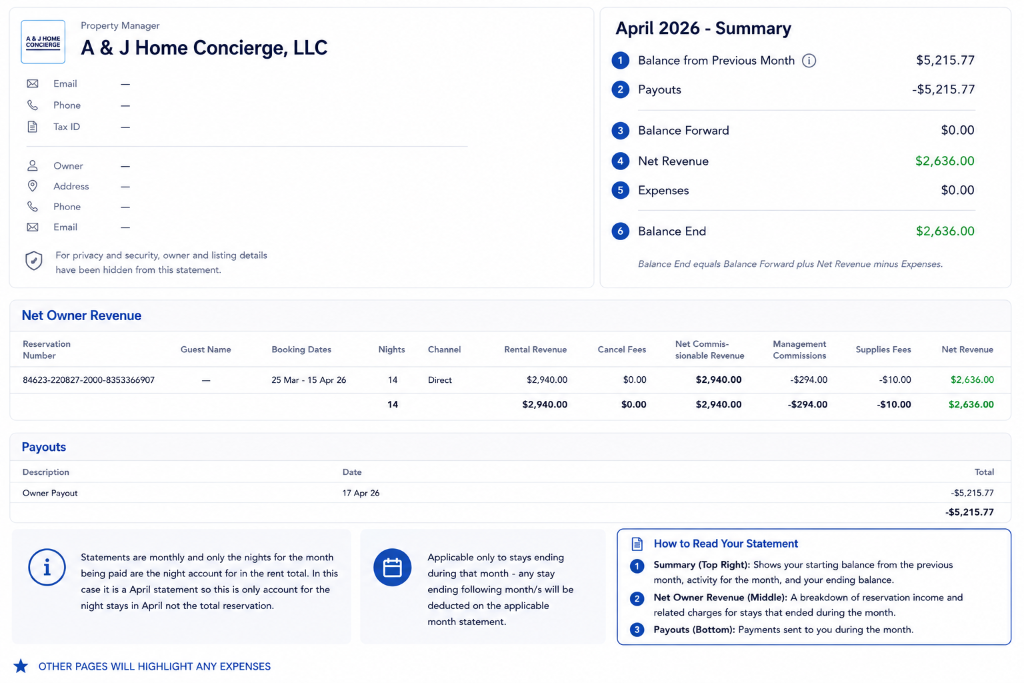
Summary (Top Right)
The summary box gives you the high-level picture of your month at a glance — starting balance, activity, and ending balance.
Balance from Previous Month
Any unpaid balance or credit carried over from last month's statement.
Payouts
The total amount we sent to you this month (shown as a negative since it's money out).
Balance Forward
The running balance after applying last month's balance and payouts. Usually $0.00 if all funds were paid out.
Net Revenue
Your total earnings from bookings this month after management commissions and fees are deducted. Shown in green.
Expenses
Any maintenance, supply, or other costs charged to your account this month.
Balance End
Your final balance for the month. This equals Balance Forward + Net Revenue − Expenses. This is what you get paid.
Net Owner Revenue (Middle)
This table lists every booking that ended during the month. Each row is one reservation. Here's what each column means:
Reservation Number
The unique booking ID from Hostaway for each reservation.
Guest Name
The guest's name. Sometimes hidden for privacy.
Booking Dates
The check-in and check-out dates of the stay.
Nights
Only nights within this statement month are counted — not the full reservation if it spans months.
Channel
Where the booking came from (e.g. Direct, Airbnb, VRBO).
Rental Revenue
The gross rental amount charged to the guest for this stay.
Cancel Fees
Any cancellation fees collected (if applicable).
Net Commissionable Revenue
The revenue amount that management commission is calculated on.
Management Commissions
Our management fee deducted from your revenue.
Supplies Fees
Any supply or consumable costs (cleaning supplies, toiletries, etc.).
Net Revenue
Your final take-home amount for this booking. This is the green number.
Important: Statements are monthly — only the nights within the statement month are counted. If a guest checks in March 25 and checks out April 15, only the April nights appear on the April statement. The March nights appear on the March statement.
Payouts (Bottom)
Description
Usually "Owner Payout" — this is the wire or ACH transfer sent to your bank account.
Date
The date the payment was sent to you.
Total
The payout amount — shown as a negative number because it's money leaving the account and going to you.
Expenses (When Applicable)
If there were any expenses during the month (maintenance calls, supply restocking, repair costs, etc.), they appear in a separate Expenses section. Each line shows a description, date, and amount. These are deducted from your Net Revenue to calculate your Balance End.
Common Questions
Why does my payout show as a negative number?
Negative numbers in accounting represent money going out. The payout is money leaving the statement and going to your bank — so it's shown as negative.
What if a reservation spans two months?
Only the nights within the statement's month are counted. The remaining nights will appear on the next month's statement.
What does "Net Commissionable Revenue" mean?
It's the revenue amount we calculate our management fee on. Sometimes cleaning fees or other pass-through charges are excluded from commission.
When do I get paid?
Owner payouts are processed monthly, typically around the middle of the following month. You'll see the exact date in the Payouts section.
Who do I contact if I have any questions?
Reach out to us at support@ajhomerentals.com or call 352-325-9950 and we'll walk through it with you.
Still have questions?
We're always happy to walk through your statement with you.